

Robertson Racing Shop
Apex Pro Gen II
Apex Pro Gen II
Couldn't load pickup availability
We were an early adopter of the Apex Pro to help us continually develop our driving. The intuitive app is easy to use, and gives an impressive amount of data at our fingertips.
APEX Pro is a tool for drivers of all skill levels, who are looking to develop their driving. From Track Days and Road Racing to Auto-cross and Hill-Climb, APEX Pro is a tool that helps improve lap times while on track and simplifies post-session data review with the most intuitive software interface available.
**Can now be sync'd with newer GoPro cameras! This will allow you to auto-start your GoPro video when you start recording data. After your session, you can overlay the data on the video and it saves right on your phone.**
APEX Pro pairs using Bluetooth to automatically save data to the APEX App on your Apple or Android. It provides accurate lap-times at over 200 official tracks around the world, and even allows for custom track creation (great for autocross or hill climbs). APEX has a suite of tools allowing drivers to review and replay data overlaid on track maps or plotted in many ways. To compare laps with other drivers, simply email or AirDrop recorded sessions to fellow drivers or driving instructors. Drivers can instantly overlay and compare sessions from the same track. While you are out on the track, friends and crew members can watch your driving position and lap-times from anywhere in the world using CrewView.
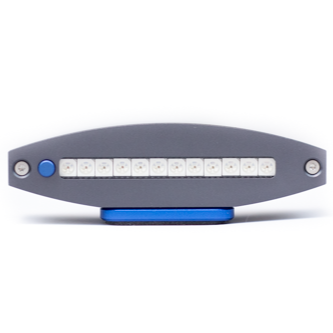
Red lights on the APEX Pro display indicate un-used potential - the tires are not at their limit. This limit is calculated by taking in thousands of sensor measurements a second from the internal GPS and accelerometers (9 Axis IMU). These raw sensor measurements are then filtered through the APEX algorithm derived from years of testing at all levels of motorsport. This process on takes a lap or two of driving at pace, and from these measurements APEX determines the car’s road holding ability (based on your driving, not a theoretical limit). That is how APEX helps you find YOUR limit. The peak measurements are compared with the other measurements to determine if those peak measurements seen in one area of the track are achievable elsewhere. Put another way you may be faster in one section of the track than another, and that is how APEX Learns where the available grip is. Red Lights represent the limit determined by the APEX algorithm, Green Lights are how close you are from that limit. For more information, check out the APEX Pro Startup Guide!
Shipping & Returns
Shipping & Returns